Tackling the travelling salesman problem: simulated annealing

This is the third part in my series on the “travelling salesman problem” (TSP). Part one covered defining the TSP and utility code that will be used for the various optimisation algorithms I shall discuss. Part two covered “hill-climbing” (the simplest stochastic optimisation method).

getting stuck, because you’re greedy

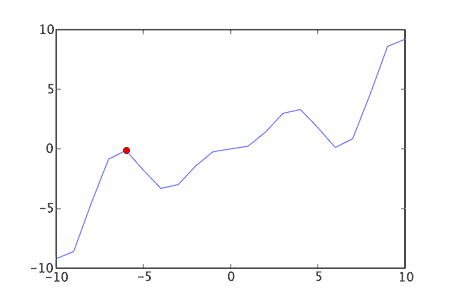
As I discussed in the article about hill-climbing it is possible for an algorithm to find a solution that is “locally optimal”, but not necessarily “globally optimal”. That is to say we may find ourselves with a solution that is at the top of a local maximum – it’s the best thing nearby, but it might not be the best thing. This happens with hill-climbing, because when we are offered the choice between two solutions we always take the best solution. The algorithm is “greedy”. It’s also short sighted.


So instead we could try occasionally choosing something that’s worse. By doing that the algorithm can go “downhill” sometimes and hopefully reach new areas of the solution landscape.

simulated annealing

Taking it’s name from a metallurgic process, simulated annealing is essentially hill-climbing, but with the ability to go downhill (sometimes).

It introduces a “temperature” variable. When the “temperature” is high a worse solution will have a higher chance of being chosen. It work’s like this:

  1. pick an initial solution
  2. set an initial temperature
  3. choose the next neighbour of the current solution:
    • if the neighbour is “better” make that neighbour the current solution
    • if the neighbour is “worse”, probabilistically make this neighbour the current solution, based on the current temperature and how much “worse” the neighbour is
  4. decrease the temperature slightly
  5. go to 3.

By slowly cooling the temperature we become less likely to choose worse solutions over time. Initially we are able to make some pretty big jumps around the solution landscape. By the end of a run we’ll be jumping around less and less. In fact if we lower the temperature enough we end up with plain old hill-climbing.

probabilistically choosing a neighbour

Below is the Python code to decide if what probability we will assign to moving from a solution with a score of prev_score to a solution with a value of next_score at the current temperature.


def P(prev_score,next_score,temperature):
    if next_score > prev_score:
        return 1.0
    else:
        return math.exp( -abs(next_score-prev_score)/temperature )

To keep later logic simpler I’m returning 1.0 if next_score is better – so we’ll always choose better solutions.

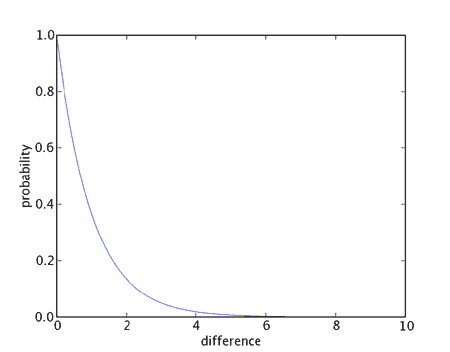
When the prev_score is worse we create a probability based on the difference between prev_score and next_score scaled by the current temperature. If we chart the probabilities versus the difference in scores we get (with a temperature of 1.0):


As can be seen, for small differences (relative to the current temperature) we will have a high probability. This then tails off very quickly, so solutions that are much worse are increasingly less likely to be chosen.

The net-effect being that solutions that are only a little bit worse are still fairly likely to be chosen. Much worse solutions may still be chosen, but it’s much less likely.

the cooling schedule

Temperature is a key part of simulated annealing. How we lower the temperature over time is therefore very important. There are a couple of possible approaches, but I’ll show the one outlined by Kirkpatrick et al:


def kirkpatrick_cooling(start_temp,alpha):
    T=start_temp
    while True:
        yield T
        T=alpha*T

This is a generator function that takes an initial start temperature (start_temp) and returns a series of temperatures that are alpha times the size, where alpha is less than one. So we end up with a temperature that drops off quite quickly and then slowly decreases to practically nothing.

remembering the best solution

One other minor, but key, implementation detail is saving the best solution we find during the annealing process.

During hill-climbing the current solution was always the best solution found, but simulated annealing will deliberately accept worse solutions at times. So we need to make sure we don’t just throw away the best we see. To avoid complicating the algorithm itself with extra checks of scores etc.

I am going to use a class to wrap the objective function. I’ll override the __call__ method of the class, so that I can use the instance of the class like a function – in place of the normal objective function:


class ObjectiveFunction:
    '''class to wrap an objective function and 
    keep track of the best solution evaluated'''
    def __init__(self,objective_function):
        self.objective_function=objective_function
        self.best=None
        self.best_score=None
    
    def __call__(self,solution):
        score=self.objective_function(solution)
        if self.best is None or score > self.best_score:
            self.best_score=score
            self.best=solution
        return score

We can then access then best and best_score fields when we have finished our annealing.

simulated annealing itself

The code below represents the simulated annealing algorithm. In many respects it is pretty similar to hill-climbing, but we are also concerned with a current temperature and we have introduced a probabilistic element to choosing the next solution.


def anneal(init_function,move_operator,objective_function,max_evaluations,start_temp,alpha):
    
    # wrap the objective function (so we record the best)
    objective_function=ObjectiveFunction(objective_function)
    
    current=init_function()
    current_score=objective_function(current)
    num_evaluations=1
    
    cooling_schedule=kirkpatrick_cooling(start_temp,alpha)
    
    for temperature in cooling_schedule:
        done = False
        # examine moves around our current position
        for next in move_operator(current):
            if num_evaluations >= max_evaluations:
                done=True
                break
            
            next_score=objective_function(next)
            num_evaluations+=1
            
            # probablistically accept this solution
            # always accepting better solutions
            p=P(current_score,next_score,temperature)
            if random.random() < p:
                current=next
                current_score=next_score
                break
        # see if completely finished
        if done: break
    
    best_score=objective_function.best_score
    best=objective_function.best

    return (num_evaluations,best_score,best)

The parameters are much the same as hill-climbing, but there are two extra specific to simulated annealing:

  • init_function - the function used to create our initial solution
  • move_operator - the function we use to iterate over all possible "moves" for a given solution
  • objective_function - used to assign a numerical score to a solution - how "good" the solution is
  • max_evaluations - used to limit how much search we will perform (how many times we'll call the objective_function)
  • start_temp - the initial starting temperature for annealing
  • alpha - should be less than one. controls how quickly the temperature reduces

I am also only reducing the temperature after either accepting a new solution or evaluating all neighbours without choosing any of them. This is done so that temperature will only decrease as we start accepting moves. As that will be less frequent than just evaluating moves we cooling will happen at a slower pace. If we are accepting lots of moves then this will drop the temperature quite quickly. If we are not accepting many moves the temperature will stay steadier - maintaining the likelihood of accepting other "worse" moves. That latter point is useful, as if we are starting to get stuck on a local maximum the temperature won't decrease - hopefully helping us get unstuck.

results

It made sense to compare simulated annealing with hill-climbing, to see whether simulated annealing really helps us to stop getting stuck on local maximums.

I performed 100 runs of each algorithm on my randomly generated 100 city tour, once with 50000 and once with 100000 evaluations. Both algorithms used the reversed_sections move operator. For simulated annealing I chose an initial temperature and alpha that seemed to perform well.

evaluations algorithm average s.d. worst best
50000 hill-climbing -4228.50 126.45 -4627.07 -3942.03
50000 annealing (start_temp=10, alpha=0.9999) -4145.69 96.56 -4422.04 -3924.34
100000 hill-climbing -4154.25 90.60 -4513.11 -3946.65
100000 annealing (start_temp=10, alpha=0.99995) -4077.40 71.72 -4294.97 -3907.19

These results seem to show that simulated annealing performed better than hill-climbing. In fact it can be seen that with just 50000 evaluations, simulated annealing was able to do a slightly better job than hill-climbing with 100000 evaluations! This makes sense, as when running hill-climbing with logging turned on I could see that after about 50000 evaluations hill-climbing was getting stuck and restarting. With more evaluations available it was possible to push simulated annealing further still.

However in both cases I had to perform several test runs to find reasonable starting temperatures and alpha values to get these kind of results. It was quite easy to set these parameters wrong and get much worse results than with hill-climbing.

conclusion

Simulated annealing is a pretty reasonable improvement over hill-climbing. For a modest amount of extra code (in this cases 10's of lines) we are able to address hill-climbing's fundamental weakness (getting stuck) and yield much better results.

However by introducing two extra parameters we have shifted some of the burden in finding good solutions to ourselves. We have to tune these parameters carefully. Values that are good for one problem may not work so well for another. We end up with more "switches to flick" in the hope of making something work.

Next time around I will be discussing evolutionary algorithms, which pursue other ways to avoid getting stuck on local maximums and are also able to combine several solutions to explore new areas of the solution landscape.

source-code

Full source-code is available here as a .tar.gz file.

(The source-code contains more code than shown here, to handle parsing parameters passed to the program etc. I’ve not discussed this extra code here simply to save space.)

17 Responses to “Tackling the travelling salesman problem: simulated annealing”

  1. Psychic Origami » Blog Archive » Tackling the travelling salesman problem: hill-climbing

    [...] of the other algorithms I will discuss later attempt to counter this weakness in hill-climbing. The next algorithm I will discuss (simulated annealing) is actually a pretty simple modification of hill-climbing, but [...]

  2. William

    Excellent group of posts on the TSP! The code looks excellent and is very easy to understand.

    However, I ran the program on my windows machine with Python 2.5 and PIL 1.1.6, It ran fine and output what looked to be the correct answer, but, the image is corrupt and I am not able to open it with anything. Did I do something wrong, or is the code possibly not designed for Python 2.5?

    I ran this command:
    “C:\Python25\python.exe” “C:\part_three\tsp.py” -o “C:\part_three\test.png” -v -n 100000 “C:\part_three\city100.txt” > “C:\part_three\tsp.log”

    This was the contents of tsp.log:
    100000 -4206.38222041 [11, 49, 74, 43, 38, 8, 14, 79, 20, 82, 87, 60, 69, 77, 44, 66, 92, 5, 68, 0, 35, 39, 56, 73, 86, 9, 30, 50, 99, 31, 19, 96, 10, 21, 34, 88, 67, 22, 18, 36, 16, 61, 41, 63, 23, 1, 90, 97, 78, 26, 54, 84, 3, 51, 48, 65, 47, 71, 53, 15, 32, 94, 55, 76, 95, 72, 58, 37, 45, 6, 93, 12, 2, 25, 98, 40, 91, 17, 29, 89, 27, 70, 33, 24, 46, 81, 7, 57, 59, 28, 85, 83, 80, 4, 42, 75, 62, 64, 13, 52]

  3. john

    Not sure why the image isn’t outputting right. I ran all of this stuff with Python2.4 on OS X (10.4), so it could be some sort of incompatibility I guess…

    How big is the image file after the script has run? Maybe it’s just not getting written to disk properly?

  4. William

    The image is 20.9kb after it is written. I uploaded the image to http://www.silliam.com/test.png

  5. john

    Hmm. Well it looks like it it should be an image, but I can’t quite see why it’s not working. I can see in a hex editor that it seems to have the right header etc. It might be the version of Python, but I’d be very surprised. It should work and I can’t see any reason it shouldn’t. Do you know if your install of PIL works properly?

    Failing that maybe see if commenting out the code that does the actual drawing (line 156-175) gives you a valid, but empty image.

  6. William

    I tried running the program with Python 2.4 and with the 1.1.5 and 1.1.6 versions of PIL. To install PIL I just used the standard windows installer that they distribute, so I assume that it works.

    Do I comment those lines in tsp.py? In tsp.py it looks like those lines haves something to do with argument parsing.

    The only thing that I could find that was strange was the header of the .png file. When I compared it to http://en.wikipedia.org/wiki/Portable_Network_Graphics#File_header it looks slightly different. I don’t know if that is correct, or if maybe there is something wrong with my system. When I get a chance, I will install Python and PIL on a bare system and see if I get the same problems.

    I really want to use this script since it is something that can be easily understood because of the comments and easy readability of python. I just wish that I could find out what was wrong with it! Thanks!

  7. john

    It is really strange. I hope you have some more luck.

    Hmmm. Maybe that line range I gave you was invalid. Basically I meant for you to try removing the code that actually renders the lines (from about where the Draw object is made to where it’s del’ed). That way you could then maybe isolate what’s being done wrong. If you still get an invalid image I’d guess that something isn’t quite right with your install, but as to what…

    Have you tried using pil to make a small blank image and save it to file?

    No scratch that! Just thing I’ve realised what’s wrong! I’ve been using this on OS X and just opening the file. As you’re on windows you’ll need to open the file in binary mode when you save to it!!

    So change:

    write_tour_to_img(coords,best,’%s: %f’%(city_file,score),file(out_file_name,’w'))

    to:

    write_tour_to_img(coords,best,’%s: %f’%(city_file,score),file(out_file_name,’wb’))

    (note the extra b)

    Hope that helps. Total oversight on my part, but easy enough to fix.

  8. William

    Perfect solution! It works perfectly now! Thank you very much for all of your help, and your great python script!

  9. Simulated annealing in OCaml « khi’s life with an ech

    [...] Simulated annealing in OCaml Posted by khigia under ocaml   I’ve been using this python implementation of simulated annealing to deduce Singapore bus service from a database of bus stops (see previous [...]

  10. Newman64

    Excellent work. I enjoyed reading and running the python code immensely.
    Is there a part 4 – Evolutionary algorithms still coming ?

    thanks, Newman

  11. john

    Hi Newman,

    probably unlikely anytime soon I’m afraid. It’s been quite a while now and there’s the added complication of a small child in my life now.

    I did actually start on the code for some evolutionary algorithms, but was having difficulty tuning it. It was pretty hard to get it working better than simulated annealing for example.

    Maybe I’ll come back to it one day.

    cheers,

    John

  12. Dmitrey

    Hi John,
    I have created TSP class in free OpenOpt software (http://openopt.org) and would like to add your solver there as well, along with casting to MILP (http://openopt.org/MILP) and using interalg (http://openopt.org/interalg).
    Which name for the solver would you prefer? (you could propose several names to easify choosing of most appropriate one). “anneal” is not appropriate to prevent confusing with scipy.optimize.anneal (and probably that solver will be connected to OpenOpt later).
    BTW, in current PyPy (http://pypy.org) your code runs 2 times faster than in CPython and probably with new versions of PyPy difference will be even bigger (though, of course, this is insufficient for approximate NP-hard problems solving).
    Regards, Dmitrey.

  13. john

    Hi Dmitrey,

    Well as long as it meets the License you can do whatever you want:

    http://www.psychicorigami.com/license/

    Not sure what the best alternate name would be though.

    cheers,

    John

  14. Matt

    I’m little new to python execution. I was trying to execute the part3 tsp.

    I’m using the PythonPortable Pyscripter which is a standalone 2.7 built.

    I was trying to run the tsp.py with command line parameters as

    Command Line : -o “C:\part_three\test.png” -v -n 100000 “C:\part_three\city100.txt” > “C:\part_three\tsp.log”

    and i’m getting this error:

    usage: python C:\part_three\tsp.py [-o ] [-v] [-m reversed_sections|swapped_cities] -n [-a hillclimb|anneal] [--cooling start_temp:alpha]
    output image file name must end in .png
    Exit code: 1

    Any suggestions of how to execute this code.

    Thanks

  15. john

    Hi Matt,

    I’m not familiar with Pyscripter, but I’m guessing that maybe the quote is being passed through as part of the filename for the png? Maybe try adding a “print out_file_name” to see what you’re getting in tsp.py (about line 259). e.g.:

        if out_file_name and not out_file_name.endswith(".png"):
            print out_file_name
            usage()
            print "output image file name must end in .png"
            sys.exit(1)
    

    cheers,

    John

  16. Ryan

    Hi John,

    Firstly, thanks for this great write-up! It’s incredibly helpful. I’m trying to implement this for line segments rather than points (to draw more efficiently with a pen plotter) but my results don’t seem so optimal. I’m doing it such that lines are one-way roads and have approached things very simply:

    I modified the cartesian matrix function so that for each start point of a line, the distances are calculated from the end point of that line to the start point of all the other lines. Should that be enough, or is the fact that I’m using “reversed sections” likely problematic considering that when you reverse the route between line a and line b you get a very different result? What strategy would you take instead?
    The current strategy does something at least, and in a few places it seems to be doing alright…which leads me to a second question:
    What is your general strategy for choosing start_anneal_temp and anneal_alpha? Is there some kind of intuitive ratio you use based on the number of points you are feeding in? I find that I sometimes get a divide-by-zero error by guessing the wrong ratio…

    Many thanks!
    Ryan

  17. john

    Hi Ryan,

    well it sounds like you’re no longer doing the Travelling Salesman Problem then. That means the representation of your solution, objective function and operators need to be different. They might end up being similar to the TSP, but the key thing with this sort of stuff is to get your representation right – otherwise you’ll never get any good results.

    You should probably store the solution as a list of line segments (equivalent of pairs of cities), then modify the objective function to calculate the total distance the plotter pen would travel to draw that solution (as that’s what you are trying to optimize).

    The reverse sections operator would still then work. It’d just re-order which lines get drawn when. You might also want to consider adding an extra operator that will reverse the direction of a line too or building that in to the reverse sections operator.

    Unfortunately their is a whole topic of research over choosing annealing schedules – it’s not very clear cut at all. It’s also been a while since I’ve had to pick any myself, but in the past I’d basically start of with a few values, then do multiple runs to see what seemed to work ok and didn’t get stuck too quickly. In short though the longer the annealing schedule (higher initial temperature and larger values of alpha) the better the final solution will be, but it will take longer…

    cheers,

    John

Leave a Reply