The Django admin site is one of the best features of Django. It really lets you just get on with building your app, without having to worry too much about how you'll administer your site.
The defaults are generally pretty good, but it's often the case that you'll want to tweak and change it (particularly when you have clients involved). Luckily it's pretty easy to customize.
One common change that many people will want to do is to display a thumbnail of an uploaded image in the admin. The default image field (when an image has been uploaded) in the admin looks like:

and we want to change it to look like this:
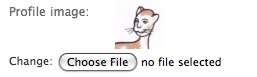
In my case I had images that I knew would be fairly small so I didn't need to use any auto-resizing or anything like that. I found this snippet for doing the same task, but decided to simplify it a fair bit and ended up with:
from django.contrib.admin.widgets import AdminFileWidget
from django.utils.translation import ugettext as _
from django.utils.safestring import mark_safe

class AdminImageWidget(AdminFileWidget):
    def render(self, name, value, attrs=None):
        output = []
        if value and getattr(value, "url", None):
            image_url = value.url
            file_name=str(value)
            output.append(u' <a href="%s" target="_blank"><img src="%s" alt="%s" /></a> %s ' % \
                (image_url, image_url, file_name, _('Change:')))
        output.append(super(AdminFileWidget, self).render(name, value, attrs))
        return mark_safe(u''.join(output))
Then to use it I simply override formfield_for_dbfield to return a field that uses that widget for the field I'm interested in:
class MyAdmin(admin.ModelAdmin):
    def formfield_for_dbfield(self, db_field, **kwargs):
        if db_field.name == 'profile_image':
            request = kwargs.pop("request", None)
            kwargs['widget'] = AdminImageWidget
            return db_field.formfield(**kwargs)
        return super(MyAdmin,self).formfield_for_dbfield(db_field, **kwargs)
It's a fairly straightforward alteration to how the ImageField widget renders in the admin, but it is often a big help to be able to actually see the image in question.
UPDATED: Feb 24th, 2010. Based on Jeremy's comment below and having upgraded to Django 1.1 I've modified this example to remove the "request" param from kwargs before passing it db_field.